
There is a reason injury and workers’ comp keywords are among the most expensive in all of Google. Every firm in the county is bidding on the same handful of high-intent phrases, because the person typing them is not browsing — they are hurt, worried, and ready to call someone today.
That intent is exactly what makes paid search so good and so dangerous. When it works, you are the first firm a ready-now injured worker sees. When it does not, you are paying premium prices to be seen by students writing papers, workers trying to file it themselves, and people who will never become a case. The difference between the two is not budget. It is discipline — and specifically, the discipline of subtraction.
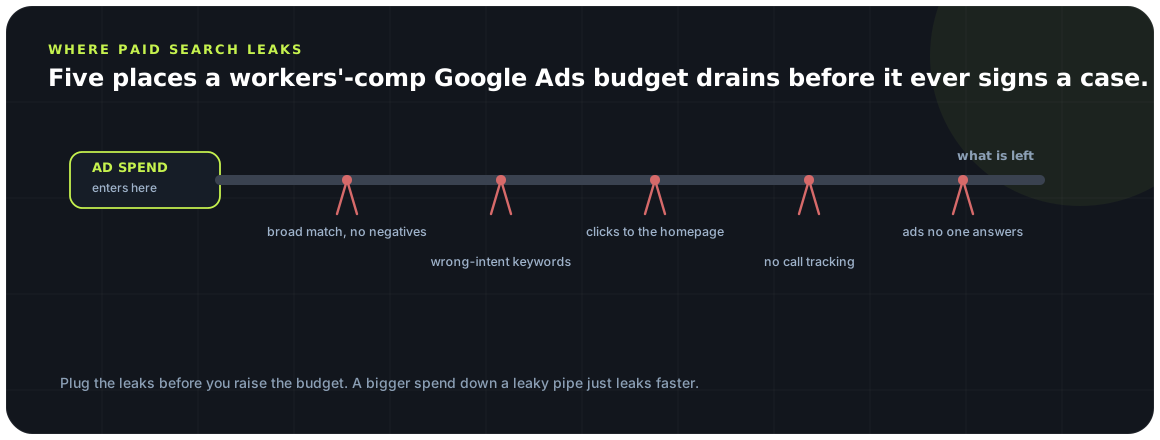
This is the field guide: the five places a workers’ comp account leaks money, and the handful of controls that turn an expensive click into a signed case. None of it requires spending more. Most of it requires spending on fewer, better things.
Why paid search is worth the price
Nobody searches “workers comp lawyer near me” for fun. Intent is the whole value — and the whole risk.
Most marketing interrupts people who were doing something else. Paid search does the opposite: it answers a question someone chose to ask. An injured worker searching for a comp attorney has already decided they might need one, which is why a search click can sign at a rate no cold audience matches. You are not creating demand; you are catching it at the moment it appears.
But the auction does not know the difference between a ready-now worker and everyone else who types similar words. It will show your ad, and charge you, for all of them equally. The searches that look identical on the surface sit on a wide spectrum of intent — and only the far end of that spectrum can become a client.

So the entire craft of paid search for a comp firm is subtraction — systematically removing the searches that look right and never convert, until what is left is mostly people who can actually become clients. Every leak below is a different way that discipline breaks down, and every fix is a different way to sharpen it.
Leak 1: broad match with no negative keywords
Broad match is Google guessing what you meant. Without negatives, it guesses generously — with your money.
Left on broad match, a bid on “workers compensation” can show your ad to someone searching how to file a claim without a lawyer, what a comp settlement is taxed at, or how to become a workers’ comp adjuster. Each of those is a real, billed click that was never going to call your firm. The account looks busy; the calendar stays empty. Broad match is not evil — it can find valuable phrases you never thought to add — but broad match without a disciplined negative list is just a faucet pointed at the drain.
It helps to know the three match types Google offers, because the leak lives in how they are used. Exact match shows your ad only for the specific phrase and its close variants. Phrase match widens it to searches that contain that phrase. Broad match — the default — widens it to anything Google decides is related, which is powerful and dangerous in equal measure. There is nothing wrong with broad match in a disciplined account that reads its search-terms report every week; there is everything wrong with broad match left alone, because “related” is a door Google will happily open in expensive directions.
The fix is a living negative-keyword list — the searches you refuse to pay for. It starts with the obvious (“jobs,” “salary,” “DIY,” “free,” “calculator,” competitor names) and grows every week from the search-terms report, which shows the exact queries that triggered your ads. Reading that report and adding negatives is the single highest-return hour in the account, and it never really ends: language changes, new junk queries appear, and a list that stops growing slowly stops working.

Leak 2: bidding on the wrong intent
Not every comp-related search is a case. Some are researchers, some are DIY filers, some are already represented.
Even with clean match types, keywords carry intent, and not all of it is buyable. “How long does a comp claim take” is a researcher. “File workers comp claim online” is someone trying to avoid hiring you. “Change workers comp lawyer” is a represented person — a case you generally cannot ethically take from another firm mid-representation. Bidding on all of them because they contain the right words is how budgets evaporate while the account manager reports growing “traffic.”
The winning keyword set is smaller and more boring than most firms expect: the phrases where the searcher clearly wants to hire a lawyer now — “workers comp attorney,” “work injury lawyer near me,” “denied workers comp claim lawyer.” Depth on the phrases that sign beats breadth across phrases that do not. It is tempting to chase volume by adding every plausible keyword; resist it, because volume made of the wrong intent is just a faster way to spend the budget.
Leak 3: sending clicks to the homepage
You paid a premium for the click. Then you dropped the person on a page built for everyone.
A homepage is a table of contents. It asks a hurt, anxious searcher to read a menu and decide where to go — and a large share of them simply leave. The click was the expensive part; wasting it on a page that makes people think is the most common self-inflicted wound in the channel. You would not run an ad promising help with a denied comp claim and then, when someone calls, put them on hold to listen to a directory of everything the firm does — but that is exactly what a homepage does to a paid click.
What converts is a dedicated landing page that matches the ad word for word, states the one thing the firm does, proves in seconds that it can be trusted, and offers a single obvious action: call now. One page, one promise, one button, fast on a phone. Every extra link, every second of load time, every moment of “where do I go?” is a place the expensive click leaks away. The full anatomy is in landing pages that convert clicks into signed cases.
Leak 4: no call tracking
If you cannot see which keyword produced the phone call, you are optimizing blind — and usually toward the wrong thing.
Most workers’ comp cases start as a phone call, not a form. If those calls are not tracked back to the ad, keyword, and landing page that produced them, the account has no idea what actually works. It will “optimize” toward cheap clicks and form fills while the keywords that quietly drive signed cases look unremarkable in the data — and get cut. This is how an account can look like it is improving on paper while the case count falls: it is being tuned toward the metric it can see, not the outcome that matters.
Call tracking closes the loop: a dynamic number on the landing page ties each call to its source, and dispositioning the call ties it to whether a case signed. Now the account can be managed to the only number that matters — cost per signed case — instead of the cheap proxies that mislead it. That is the same discipline we lay out in the attribution guide: connect the click to the signed case, or you are guessing with a budget.
Leak 5: running ads you cannot answer
An ad that generates a call at 9 p.m. and a voicemail box is a receipt for money you gave away.
Paid search does not respect office hours, and injured workers reach out after the shift, after the ER, and after the denial letter. If the ads run around the clock but the phones close at five, the firm is paying full price for clicks whose calls ring into the void — and the searcher simply calls the next firm on the results page. The channel is only as good as the desk behind it; a perfect account feeding an unstaffed phone still loses the case.
The economics are worse than they look on the surface. If even a tenth of your clicks arrive outside answerable hours and roll to voicemail, you are not losing a tenth of your leads — you are losing that slice of the budget to clicks that never had a chance, plus every case those searchers went on to sign with whoever did pick up. The waste is doubled: the money you spent, and the case you handed to a competitor by being unreachable at the one moment the worker was ready to act.
The fix is to match coverage to spend: either answer the phone whenever the ads run, or schedule the ads to the hours you can answer. Speed-to-lead and after-hours coverage are not separate projects from paid search — they are what make paid search pay. See the five-minute rule and after-hours intake. The cheapest way to raise the return on an ad budget is often to answer the calls it already produces.
What actually converts
Strip the leaks away and the recipe is short. It is control, not budget.
Put the fixes together and a pattern emerges: none of them is a spending lever. Every one is a control that removes waste or keeps value you already paid for. That is why one firm profits on paid search while its neighbor, spending more on the same keywords, quietly loses money and blames the channel.

| Control | What it does |
|---|---|
| Tight keyword set | Bids only on hire-a-lawyer-now intent |
| Living negative list | Refuses to pay for researchers, DIY, and jobs |
| Geo & schedule | Spends only where and when you can serve and answer |
| Dedicated landing pages | Keeps the expensive click instead of wasting it |
| Call tracking | Ties every call to its source and its outcome |
| Sub-five-minute response | Turns the call into a signed case |
Read that list and notice how little of it a new agency will bring up when it pitches you, because none of it justifies a bigger media budget. The unglamorous controls are exactly where the returns live — and exactly what gets skipped when an account is run on autopilot.
Search, LSA, or both
They are complementary, not competing. Most firms should run both, in the right order.
Local Services Ads sit above the regular ads, charge per lead rather than per click, and carry Google’s screened badge — the top pay-per-lead slot, and usually the first dollar a firm should spend on search. Standard search ads sit underneath and give you the control LSAs do not: specific keywords, dedicated landing pages, and full tracking. The two together cover the page, and each catches intent the other misses.

The order matters as much as the mix. Start with LSAs for the screened, pay-per-lead slot at the very top; add search ads underneath for the keywords, geographies, and landing-page control LSAs cannot give you. The LSA playbook is in winning Google Screened leads; this article is its per-click other half. Run tightly, together they are the most direct line a firm has to the injured worker who is searching right now — which is the warmest case in the entire market.
Sizing the spend
The right budget is not a percentage of revenue or a number an agency suggests. It is derived from what a signed case is worth to you.
Once the account is tight and the tracking is honest, the budget question largely answers itself from the bottom up. You know, or can now learn, your cost per signed case on the channel. You know what a signed case is worth to the firm. As long as the first sits comfortably below the second, more spend buys more profitable cases — and the moment it does not, you have found your ceiling and can stop, precisely, instead of guessing.
That is the discipline that keeps paid search from becoming a black hole. A firm that scales spend before it knows its cost per signed case is flying blind and calling it ambition; a firm that scales after simply turns a known-good machine up a notch at a time. And the true ceiling is usually intake, not money: there are only so many people searching for a comp lawyer in a county this month, and only so many calls a desk can answer well. Push past either and cost per case climbs whatever the budget says. The full framework — media versus management fee, the ramp, and sizing spend to unit economics — is in how much a WC firm should spend on marketing.
Key takeaways
-
Comp keywords are among the most expensive in Google. Every firm in the county bids on the same handful of terms, so paid search only pays if nothing leaks.
-
Broad match with no negatives burns budget first. The fastest leak is paying for searches that were never going to sign a case.
-
A homepage click is a wasted click. Intent-matched landing pages, not the homepage, are what convert a paid comp search.
-
If you cannot answer the call, do not run the ad. Paid search without fast intake coverage pays for calls your competitors answer.
-
Search and LSA do different jobs. Size the spend to both deliberately: one captures typed intent, the other the pay-per-lead top of the pack.
Frequently asked questions
Are Google Ads worth it for a workers’ comp firm?
Yes, when they are run tightly. Paid search reaches injured workers at the exact moment they go looking for a lawyer, which makes it the highest-intent channel available. The catch is that the same auction will happily spend your budget on students researching a claim, DIY filers, and job seekers if you let it. Run with tight keywords, real negative lists, dedicated pages, and call tracking, it is often the most profitable channel; run loosely, it is the fastest way to burn money.
How much do workers’ comp Google Ads cost?
Clicks for injury and comp terms are among the most expensive in all of search, because every firm in the county is bidding on the same intent. But click price is the wrong number to manage. What matters is cost per signed case, and a tightly run account with a pricier-looking click can beat a loose one every time. Size the budget from your unit economics, not from a click price.
What is the difference between Google Ads and Local Services Ads?
Local Services Ads sit at the very top, charge per lead rather than per click, and require Google screening; standard search ads charge per click and give you far more control over keywords, landing pages, and tracking. They are complementary, not competing — most firms should run LSAs for the top-of-page pay-per-lead slot and search ads underneath for the keywords and geographies LSAs do not cover.
Why is my Google Ads budget being wasted?
Almost always one of five leaks: broad match with no negative keywords, bidding on the wrong intent, sending clicks to a homepage instead of a dedicated page, no call tracking so you cannot see what converts, and running ads during hours you cannot answer the phone. Each one spends real money on clicks that were never going to sign a case.
Should the ads send clicks to my homepage?
No. A homepage asks a hurt, anxious searcher to figure out where to go next, and most of them leave. A dedicated landing page that matches the ad, states the one thing you do, proves you can be trusted, and offers a single obvious way to call converts far better. The click is expensive; the page is where you either keep it or waste it.
What are negative keywords and why do they matter so much?
Negative keywords are the searches you tell Google never to show your ad for — ‘jobs,’ ‘salary,’ ‘free,’ ‘how to file,’ competitor names. Without them, broad and phrase matching quietly serve your ad to researchers, DIY filers, and job seekers, and you pay for every click. A living negative list, grown weekly from the search-terms report, is the single highest-return hour of work in the whole account.
Sources & further reading
-
01
Google Ads documentation
Google Ads Help covers match types, negative keywords, conversion tracking, and the settings behind every leak.
-
02
Further reading
What a paid click needs to convert.
Platform rules and benchmarks change over time; confirm current details in the platform’s own documentation. General marketing information, not legal advice.